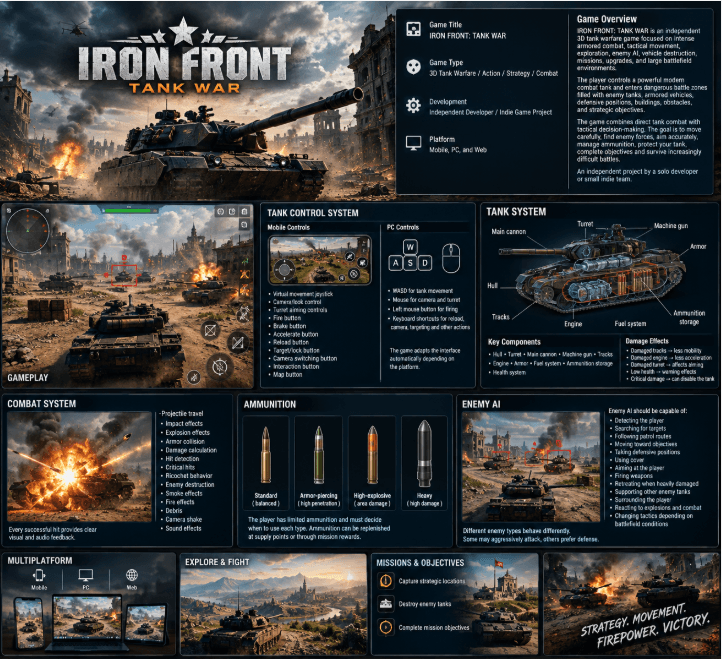
TANK WAR
About this game
INDEPENDENT TANK WAR – FULL GAME DESCRIPTION
Game Title
IRON FRONT: TANK WAR
Game Type
3D Tank Warfare / Action / Strategy / Combat
Development
Independent Developer / Indie Game Project
Platform
Mobile, PC, and Web
Game Overview
IRON FRONT: TANK WAR is an independent 3D tank warfare game focused on intense armored combat, tactical movement, exploration, enemy AI, vehicle destruction, missions, upgrades, and large battlefield environments.
The player controls a powerful modern combat tank and enters dangerous battle zones filled with enemy tanks, armored vehicles, defensive positions, buildings, obstacles, and strategic objectives.
The game combines direct tank combat with tactical decision-making. Players must move carefully across the battlefield, locate enemy forces, aim accurately, manage ammunition, protect their tank, complete objectives, and survive increasingly difficult battles.
The entire project is designed as an independent game developed by a solo developer or small indie development team.
---
CORE GAMEPLAY
The player starts each mission inside a combat zone with a controllable tank.
The tank can:
- Move forward and backward.
- Turn left and right.
- Rotate the turret independently.
- Aim the main cannon.
- Fire different types of ammunition.
- Accelerate and brake.
- Navigate around buildings and obstacles.
- Detect enemy vehicles.
- Receive damage.
- Destroy enemy tanks.
- Capture strategic locations.
- Complete mission objectives.
Combat should feel responsive and powerful while remaining accessible to new players.
Every battle should encourage the player to think about positioning, movement, cover, distance, ammunition, and enemy locations.
---
TANK CONTROL SYSTEM
The game features a complete tank control system.
Mobile Controls
The mobile version includes:
- Virtual movement joystick.
- Camera/look control.
- Turret aiming controls.
- Fire button.
- Brake button.
- Accelerate button.
- Reload button.
- Target/lock button.
- Camera switching button.
- Interaction button.
- Map button.
The controls should be large enough for comfortable touchscreen gameplay.
PC Controls
PC players can use:
- WASD for tank movement.
- Mouse for camera and turret control.
- Left mouse button for firing.
- Keyboard shortcuts for reload, camera, targeting, and other actions.
The game should automatically adapt the interface depending on the platform.
---
TANK SYSTEM
The player's tank contains multiple functional systems.
Main Components
- Hull.
- Turret.
- Main cannon.
- Machine gun.
- Tracks.
- Engine.
- Armor.
- Fuel system.
- Ammunition storage.
- Health system.
Different components can visually react to damage.
For example:
- Damaged tracks reduce mobility.
- Damaged engine reduces acceleration.
- Damaged turret affects aiming.
- Low health creates warning effects.
- Critical damage can disable the tank.
---
COMBAT SYSTEM
The combat system is based on projectile physics and collision detection.
When the player fires the cannon, the projectile travels through the environment and interacts with tanks, buildings, terrain, and obstacles.
The game should include:
- Projectile travel.
- Impact effects.
- Explosion effects.
- Armor collision.
- Damage calculation.
- Hit detection.
- Critical hits.
- Ricochet behavior.
- Enemy destruction.
- Smoke effects.
- Fire effects.
- Debris.
- Camera shake.
- Sound effects.
Every successful hit should provide clear visual and audio feedback.
---
AMMUNITION
The player has limited ammunition.
Different ammunition types can provide different combat characteristics.
Examples include:
- Standard ammunition.
- Armor-piercing ammunition.
- High-explosive ammunition.
- Heavy ammunition.
The player must decide when to use each type.
Ammunition can be replenished at supply points or through mission rewards.
---
ENEMY AI
Enemy tanks are controlled by an intelligent AI system.
Enemy AI should be capable of:
- Detecting the player.
- Searching for targets.
- Following patrol routes.
- Moving toward objectives.
- Taking defensive positions.
- Using cover.
- Aiming at the player.
- Firing weapons.
- Retreating when heavily damaged.
- Supporting other enemy tanks.
- Surrounding the player.
- Reacting to explosions and combat.
- Changing tactics depending on battlefield conditions.
Different enemy types should behave differently.
Some enemies may aggressively attack while others remain behind cover and provide long-range support.
---
ENEMY TYPES
The game can contain several classes of enemy vehicles.
Light Tank
Fast and lightly armored.
Medium Tank
Balanced speed, armor, and firepower.
Heavy Tank
Slow but heavily armored and powerful.
Tank Destroyer
Long-range combat vehicle specialized in destroying armored targets.
Armored Vehicle
Fast support vehicle equipped with lighter weapons.
Boss Tank
A powerful special enemy appearing during important missions.
Boss battles should introduce unique combat situations instead of simply giving the enemy more health.
---
BATTLEFIELDS
The game contains large 3D battlefields.
Possible environments include:
- Desert battlefields.
- Abandoned cities.
- Military bases.
- Villages.
- Industrial zones.
- Rocky mountains.
- Forest areas.
- Open plains.
- Destroyed urban areas.
- Military checkpoints.
Battlefields should contain:
- Buildings.
- Roads.
- Bridges.
- Walls.
- Rocks.
- Trees.
- Craters.
- Destroyed vehicles.
- Barricades.
- Military structures.
- Supply stations.
- Strategic locations.
The environment should provide natural cover and tactical opportunities.
---
DESTRUCTIBLE ENVIRONMENT
Selected environmental objects can be damaged or destroyed.
Examples:
- Walls.
- Barricades.
- Small buildings.
- Vehicles.
- Wooden structures.
- Defensive positions.
Destruction should create debris and visual effects while keeping performance optimized.
---
MISSION SYSTEM
The game features a mission-based campaign.
Mission objectives can include:
- Destroy enemy tanks.
- Defend a military base.
- Capture an objective.
- Escort friendly vehicles.
- Survive enemy waves.
- Destroy a boss tank.
- Reach a specific location.
- Protect an allied convoy.
- Destroy enemy artillery.
- Recover supplies.
- Clear an enemy-controlled area.
Each mission should have clear objectives displayed on the HUD
---
CAMPAIGN MODE
The campaign consists of multiple missions connected through a simple storyline.
The player begins with a basic tank and gradually becomes involved in larger battles.
As missions progress:
- Enemy numbers increase.
- Enemy AI becomes more advanced.
- Battlefields become larger.
- Objectives become more complex.
- Stronger tanks appear.
- New weapons become available.
- New environments are unlocked.
The campaign should provide a sense of progression without requiring an online connection.
---
SINGLE-PLAYER MODE
The main game mode is completely playable offline.
The player can:
- Start a mission.
- Fight AI enemies.
- Complete objectives.
- Earn rewards.
- Upgrade the tank.
- Unlock equipment.
- Continue the campaign.
No multiplayer connection is required for the core single-player experience.
---
TANK UPGRADES
Players earn currency or upgrade points by completing missions.
Upgrades can improve:
- Armor.
- Cannon damage.
- Reload speed.
- Engine power.
- Maximum health.
- Mobility.
- Turret rotation speed.
- Accuracy.
- Ammunition capacity.
- Detection range.
The upgrade system should provide meaningful choices rather than making every tank identical.
---
TANK CUSTOMIZATION
Players can customize their vehicle with:
- Different camouflage patterns.
- Paint variations.
- Decals.
- Tank markings.
- Turret accessories.
- Cosmetic effects.
Customization should primarily be visual and should not be required to progress.
Team
Discussions
Be the first to share your thoughts.